
7 Visual Design Mistakes to Avoid in Your Bulk Certificate Generator
Published on September 29, 2026

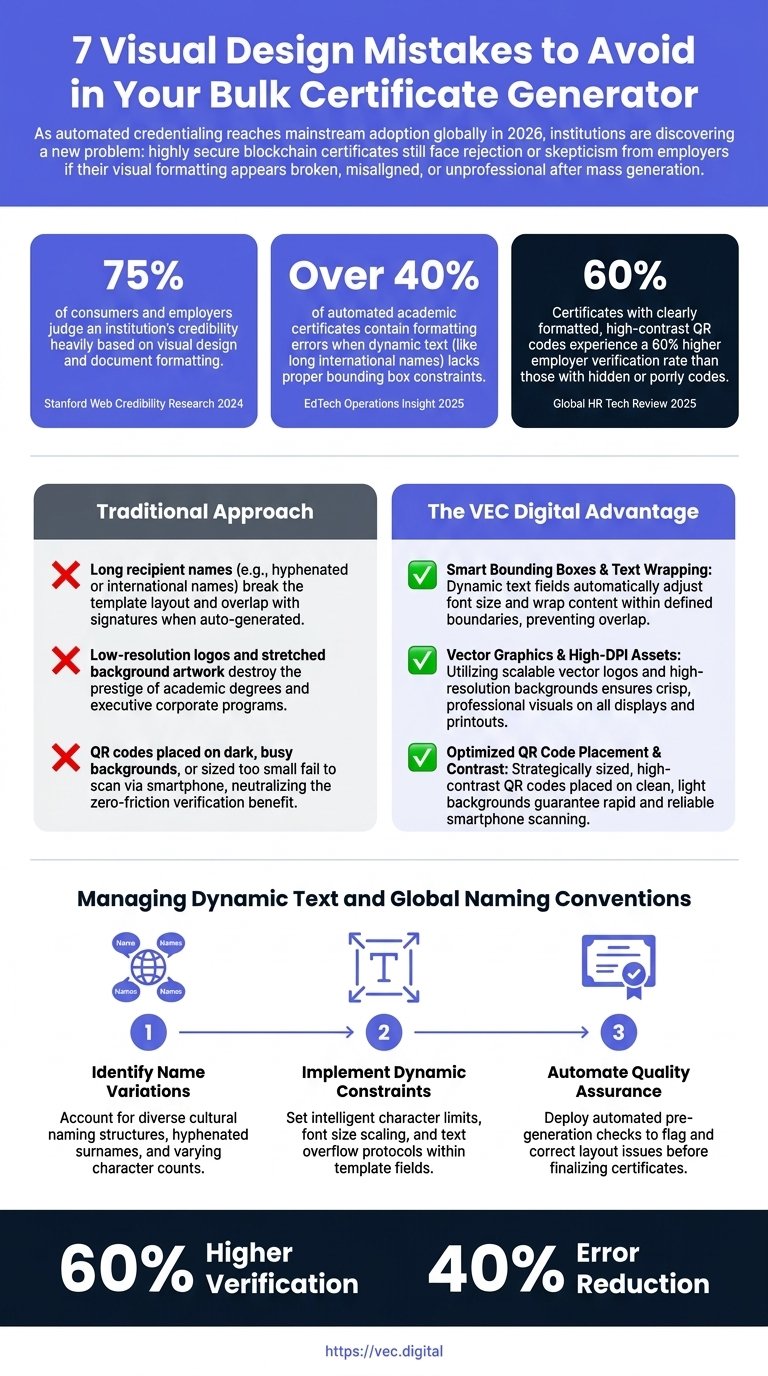
Over 75% of consumers and employers judge an institution's credibility heavily based on visual design and document formatting, according to 2024 Stanford Web Credibility Research. When scaling educational or corporate recognition, relying on a bulk certificate generator without strict visual formatting constraints often results in broken layouts that undermine the very achievements they represent. Ensuring aesthetic perfection at scale is no longer optional for organizations aiming to maintain global prestige.
As leaders in educational technology, our team at VEC Digital understands that cryptographic security must be paired with flawless frontend user experience. In this comprehensive guide, you will learn how to configure dynamic text placeholders to prevent overlapping, optimize scannable elements for instant employer verification, and configure high-resolution templates that maintain their aesthetic integrity during massive automated issuances.
Key Takeaways
- Implement bounding box constraints to accommodate variable global naming conventions without breaking template layouts.
- Optimize QR code contrast and sizing to guarantee frictionless smartphone scanning for external auditors.
- Maintain high brand trust and credibility by standardizing vector graphics and high-resolution background assets.
- Select professional typography that scales dynamically across international characters and long academic titles.
- Utilize a visual digital diploma platform to lock design layers before executing high-volume CSV batch runs.
The Hidden Cost of Formatting Errors in High-Volume Credentialing
The Impact of Aesthetics on Institutional Trust
When institutions evaluate a bulk certificate generator, the primary focus is often placed on backend efficiency—how fast the system can parse a CSV file or trigger an API call. However, the visual output of that system carries immense psychological weight. According to the 2024 Stanford Web Credibility Research, 75% of consumers and employers judge an institution's credibility heavily based on visual design and document formatting. A certificate is the ultimate visual representation of an organization's brand equity, and when that document appears misaligned or amateurish, the perceived value of the credential plummets.
Furthermore, maintaining strict visual consistency across an organization's credentialing system increases institutional brand trust by up to 33%, according to the 2024 Lucidpress Brand Consistency Index. For global universities and multinational corporate training programs, a credential must look identical whether it is issued to one executive in London or a cohort of ten thousand students in Dubai. If the automated process fails to respect the original design constraints, the resulting discrepancies can cause employers to question the legitimacy of the issuing body.
Why Bad Design Neutralizes Cryptographic Security
There is a significant gap in modern credentialing strategy: while most platforms emphasize the importance of blockchain certificate verification, they neglect the frontend user experience. Cryptographic security is essential, but it operates invisibly in the background. If a highly secure, immutable blockchain certificate is delivered to a graduate with overlapping text, stretched logos, and a broken layout, the immediate human reaction is skepticism. Employers do not inspect the blockchain hash first; they look at the visual presentation.
If the visual formatting appears broken, misaligned, or unprofessional after mass generation, highly secure blockchain certificates still face rejection or skepticism from employers. A perfectly executed cryptographic ledger cannot salvage a document that looks like a forged PDF. Therefore, administrators must treat visual formatting constraints with the same level of rigorous testing as their data encryption protocols, ensuring that the physical or digital artifact perfectly reflects the security behind it.
Managing Dynamic Text and Global Naming Conventions
Bounding Box Constraints for Variable Data
One of the most common questions administrators ask is: How do you prevent text overlapping on automated certificates? The answer lies in the intelligent configuration of your bulk certificate generator. Over 40% of automated academic certificates contain formatting errors when dynamic text (like long international names) lacks proper bounding box constraints, according to 2025 EdTech Operations Insight. When a system simply drops text onto a coordinate without understanding the spatial limits of the design, catastrophic layout failures occur.
To prevent these errors, a robust system must utilize dynamic bounding boxes. A bounding box defines the maximum width and height a specific text field can occupy. When the variable data injected into that field—such as a lengthy course title or a complex recipient name—exceeds the physical boundaries of the box, the system must automatically execute text-scaling or text-wrapping algorithms. By forcing the text to shrink in font size or break to a new line rather than bleeding across the page, administrators can guarantee that the text will never overlap with critical design elements like authorized signatures or institutional seals.
Accommodating International Names
Globally, naming conventions vary drastically. A graduate from the Middle East or Spain may have a full legal name exceeding 45 characters, whereas a student in the United States might have a 12-character name. This discrepancy highlights a major pain point: long recipient names often break the template layout and overlap with signatures when auto-generated. So, how do you design a certificate with dynamic name fields that cater to a truly international audience?
A truly global digital credential system requires advanced text-scaling, alignment guides, and dynamic layout constraints to accommodate worldwide data without manual intervention. When designing your template, you must anchor the dynamic name field centrally (or logically based on the design) and apply a relative scaling rule. This ensures that a short name remains prominent and legible, while a multi-hyphenated international name elegantly reduces in point size to fit the designated horizontal space. Testing your template with the longest possible expected string of characters is a mandatory best practice before initiating any high-volume issuance pipeline.
Optimizing Scannability with a QR Code Certificate Maker
Sizing and Contrast Rules for Instant Verification
The integration of scannable technology has revolutionized background screening, but it requires precise visual execution within a bulk certificate generator. Certificates with clearly formatted, high-contrast QR codes experience a 60% higher employer verification rate than those with hidden or poorly sized codes, according to the 2025 Global HR Tech Review. When utilizing a QR code certificate maker, administrators must recognize that the code is not just a design element; it is a functional portal to the source of truth.
A major pain point occurs when QR codes are placed on dark, busy backgrounds, or sized too small. This neutralizes the zero-friction verification benefit, as smartphone cameras fail to distinguish the data modules from the background noise. To ensure flawless scannability, QR codes must be rendered in pure black (or a very dark, high-contrast color) against a solid white or highly luminous background. Adhering to the Web Content Accessibility Guidelines (WCAG) for contrast ratios can serve as an excellent benchmark to guarantee that any external auditor can scan the document instantly.
Troubleshooting Verification Failures
When recipients or employers ask, Why is the QR code on my certificate not scanning?, the issue is rarely a broken link; it is almost always a visual formatting error. A QR code requires a "quiet zone"—a mandatory margin of negative space surrounding the code that allows the scanning lens to recognize where the code begins and ends. If background graphics, text, or borders encroach upon this quiet zone during batch generation, the code becomes unreadable.
Additionally, the physical size of the printed or rendered code matters. While QR code error correction standards allow for some data loss, a code rendered smaller than 2x2 centimeters on a standard A4 or Letter-sized document will struggle to resolve on older smartphone cameras. When configuring your template, always lock the aspect ratio of the QR code placeholder and ensure it occupies a prominent, uncluttered sector of the layout, completely isolated from dynamic text expansion zones.
Resolution, Typography, and Asset Quality in a Digital Diploma Platform
Preventing Pixelation in High-Stakes Records
The aesthetic prestige of a credential is directly tied to its image resolution. When utilizing a bulk certificate generator, administrators must upload assets that can withstand high-definition digital viewing and physical printing. High-resolution digital credentials are shared on professional networks like LinkedIn 3x more often than pixelated or badly formatted PDFs, according to the 2025 Social Learning & Engagement Report. Low-resolution logos and stretched background artwork destroy the prestige of academic degrees and executive corporate programs.
This leads to a critical question: What is the standard resolution for a digital diploma platform? For optimal results, background artwork should be designed at a minimum of 300 DPI (Dots Per Inch) with pixel dimensions of at least 3508 x 2480 pixels for standard A4 landscape sizing. Furthermore, institutional logos and official seals should always be uploaded as vector graphics (such as SVG files) or high-resolution transparent PNGs. Vector graphics scale infinitely without losing quality, ensuring that your digital diploma platform renders a crisp, authoritative document every single time, regardless of the device the employer is using to view it.
Selecting Professional Typography
Typography is the silent ambassador of your institution's brand. When users ask, What are the best professional fonts for digital certificates?, they are looking for a balance between tradition and digital legibility. While ornate script fonts (like Old English or Blackletter) are deeply traditional for the header of an academic diploma, they are disastrous for dynamic data fields. Variable data such as the recipient's name, the course title, and the issue date must be rendered in highly legible, professional typefaces.
For dynamic fields, it is best practice to utilize clean serif fonts (like Merriweather, Playfair Display, or Garamond) which convey academic authority, or modern sans-serif fonts (like Roboto, Montserrat, or Open Sans) which are excellent for corporate training and technology bootcamps. A robust platform will offer access to a vast library, such as the 1400+ Google Fonts available in advanced editors, ensuring broad language support. Crucially, the chosen font must support international characters and diacritical marks to prevent automated systems from substituting missing characters with generic, unformatted blocks.
Securing the Layout to Prevent Degree Fraud and Issuance Errors
Locking Layers Before Mass Batching
Operational efficiency is destroyed when visual formatting fails at scale. A severe pain point for operations managers is wasting hours manually correcting and re-issuing individual certificates after a failed 5,000-person CSV upload due to design clipping. When administrators ask, How can I ensure formatting doesn't break in a bulk certificate generator?, the solution lies in layer management and template locking.
Before executing any mass batching process, every static element of the certificate—the background, the borders, the institutional logos, and the boilerplate text—must be locked into a foundational layer. Dynamic placeholders should exist on a separate, elevated layer with strict alignment guides (e.g., center-aligned horizontally) and predefined bounding boxes. By treating the digital template like a rigidly structured database rather than a free-form canvas, institutions eliminate the risk of variable data shifting critical design elements out of place during automated generation.
Integrating Blockchain Certificate Verification Visually
To effectively prevent degree fraud, the visual design must clearly communicate the security protocols protecting the document. While the cryptographic hash secures the data, the visual template must instruct the viewer on how to interact with that security. Integrating a designated space for a "Blockchain Verified" badge or a clear instructional call-out next to the QR code bridges the gap between complex technology and user behavior.
By visually guiding the employer to scan the code, you activate the verifiable digital credentials framework. The design should leave no ambiguity about the document's authenticity. A well-formatted credential acts as a physical-to-digital link, where the pristine visual layout builds initial trust, and the embedded scannable technology provides the definitive, tamper-proof cryptographic proof.
Scale Your Credentialing Engine with VEC Digital
Mastering the visual design and dynamic formatting of high-volume credentials is essential for protecting your institution's global reputation. When you combine aesthetic perfection with immutable blockchain security, you provide your learners with a highly shareable asset and give employers absolute certainty in their hiring decisions. Avoid the hidden costs of formatting errors and manual corrections by adopting a system engineered for both visual precision and cryptographic trust.
VEC Digital provides a comprehensive, visual drag-and-drop template editor designed specifically to handle complex global naming conventions, dynamic bounding boxes, and high-resolution automated batching. Our platform ensures that whether you are issuing ten certificates or ten thousand, every single document maintains flawless formatting and instant scannability.
Secure your organization's credentials today—design your first template in minutes with no setup fees. To learn more about our enterprise solutions and seamless issuance capabilities, visit us at https://vec.digital or contact our team directly at support@vec.digital.